Admin Dashboard
The Admin Dashboard serves as the central command hub of NFCRM, providing complete system-level control, visibility, and configuration capabilities across all modules and users.
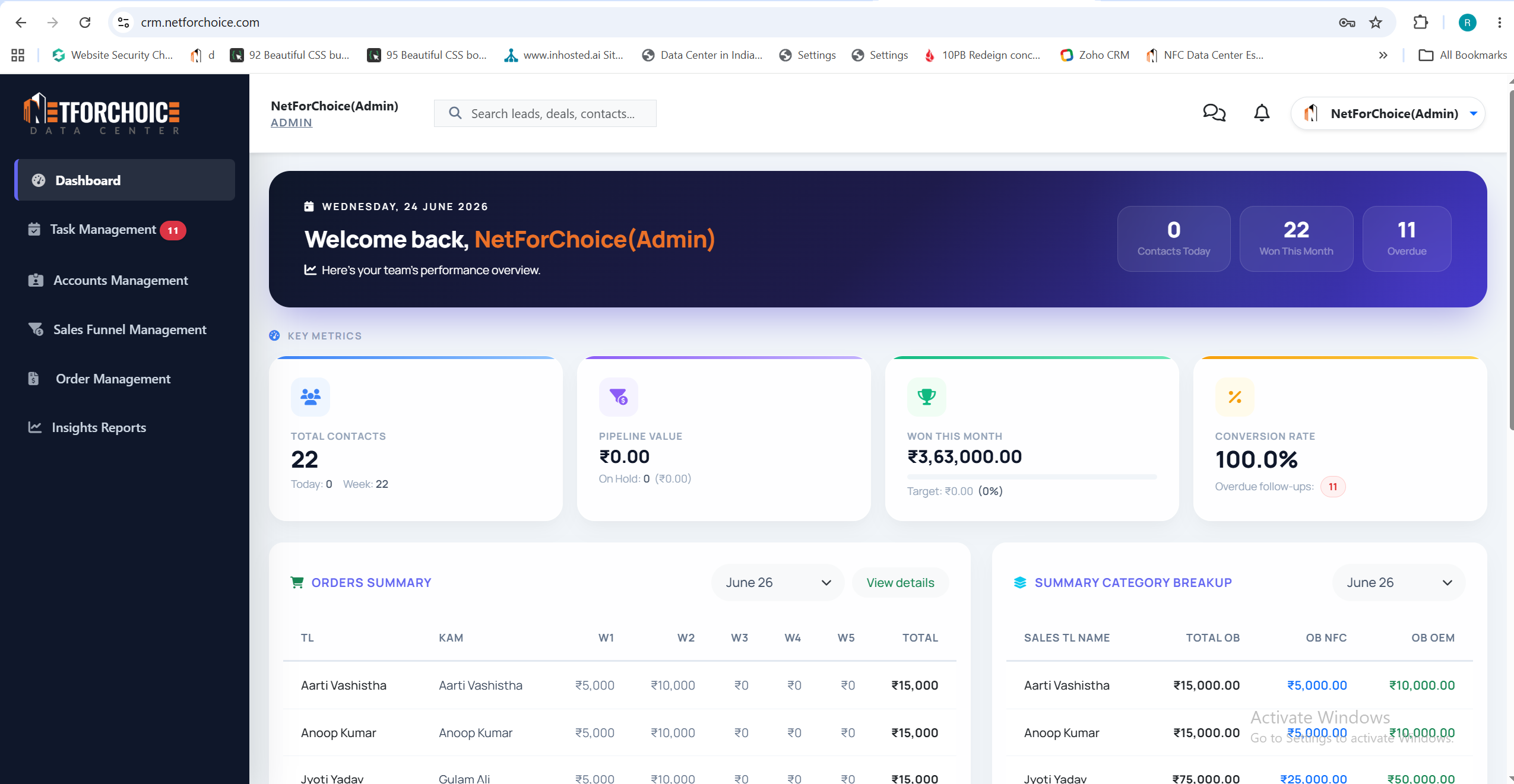
Unlike role-specific dashboards, the Admin Dashboard is designed for full oversight of the entire CRM ecosystem. It enables administrators to manage users, monitor system-wide performance, enforce security policies, and configure business workflows.
🧠 Core Responsibilities
System-wide Visibility
Access aggregated data across all teams, including leads, deals, revenue, and performance metrics.
User & Role Management (RBAC)
Create, update, and manage users with role-based access control (super_admin, manager, sales_rep).
- Business Configuration: Configure pipelines, lead sources, deal stages, and system workflows according to business requirements.
- Revenue & Performance Analytics: Monitor overall revenue trends, conversion rates, and sales performance across departments.
- System Governance & Control: Ensure compliance, monitor activity logs, and maintain operational integrity of the CRM.
⚙️ Admin Workflow
Onboard and manage users
Define appropriate roles and permissions for each team member.
Define and configure sales pipelines
Customize business rules to match company sales strategies.
Monitor system-wide KPIs
Track performance metrics across teams to identify growth opportunities.
Audit user activities
Maintain compliance and ensure data integrity within the CRM.